Browser reloaded (3/3)
Jetzt komme ich endlich zum "wie" ...
JSP's
Wenn ich die Entwicklung von dem Bild-Browser Revue passieren lasse, dann war es der Anforderungsklärung mit mir folgend ein iterativer Prozeß, an dem am Ende ein ausführliches Refactoring stand. Zwischenzeitlich hatte ich für jeden Bildtyp einen eigenen Browser "gekopiert". Es gibt fünf eng verwandte JSP Browser-Programme :
| Typ | JSP | Inhalt | Formate |
|---|---|---|---|
| Photos | CarPhotos.jsp | Autos von Teams | logisch |
| DriverPhoto.jsp | Fahrer und ihre Autos | logisch | PhotoData.jsp | Fotos von Rennen | Filesystem, physikalisch |
| PhotoQuery.jsp | Query | logisch | Cutaways | PosterData.jsp | Technische Aufrisszeichnungen | Filesystem, physikalisch |
| Poster | Offizielle Poster der F1-Rennen | ||
| Buhrer Zeichnungen | Illustrationen von W. Buhrer | ||
| Graphiken | Bilder, Zeichnungen und Graphiken |
Parameter
Die fünf JSP Programme werden mit folgenden Parametern aufgerufen:
| Parameter | CarPhotos.jsp | DriverPhoto.jsp | PhotoData.jsp | PhotoQuery.jsp | PosterData.jsp |
|---|---|---|---|---|---|
| Team | X | ||||
| Car | X | myRange1 | X | X | X | X | X |
| myRange2 | X | X | X | X | X | maxHits | X | X | X | X |
| Driver2forename | X | ||||
| Driver2 | X | ||||
| Query | X | X | |||
| step | X | X | |||
| round | X | X | |||
| app | X | ||||
| year | X | X |
Die Aufrufparameter bedeuten:
- Team ist der Teamname
- Car bezeichnet einen Fahrzeugnamen
- myRange1 und myRange2 sind die x und y Dimensionen des Grids
- maxHits gibt die maximal gewünschte Anzahl von Ergebnissen einer Query an.
- Driver2forename und Driver2 sind Vor- und Nachname eines Fahrers
- step ist die Nummer der aktuellen Auswahl von Bildern (falls es mehrere Seiten gibt)
- round ist die ...
- app bestimmt die Daten für die Posterapp (Poster, Cutaway, ..)
- year ist selbsterklärend, oder?
JAVA Klassen
Die unterschiedlichen Bilddaten-/typen bedingen unterschiedliche Anwendungsdaten. Fürdas Handling dieser Anwendungspezifischen Daten gibt es die Klasse "Poster.java" :
| für Typ | Klasse | Anwendungsspezifische Daten | |
|---|---|---|---|
| Photos von Rennen Query Cutaways Photos Zeichnungen Graphiken | Poster.java | Navigation (Next, Prev) Zoomgrößen (Modal Content) Pop Up Einstellungen weitere Seiten |
Struktur der JSP
JSP sind im wesentlichen HTML Seiten in die Java Code eingebettet sind. Der Aufbau eines JSP Programmes folgt im wesentlichen dem Layout der Seite.
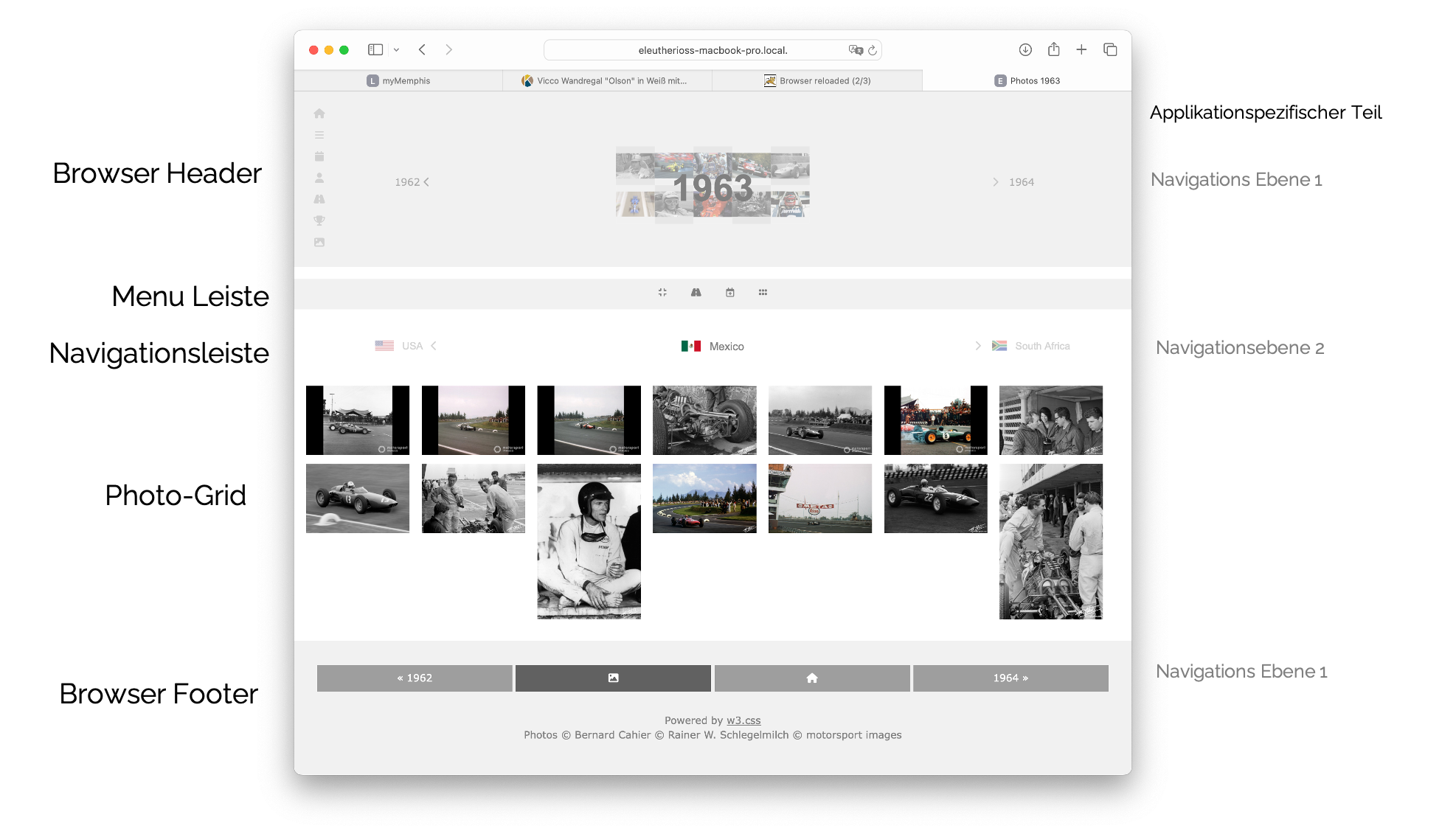
Der struktutelle Aufbau des JSP-Programme ist sehr ähnlich (da das Layout ähnlich ist), und im folgenden exemplarisch für Poster.Data.jsp dargestellt. Wenn ich mal wirklich Zeit habe werde ich den Code mal didaktisch Stück für Stück erklären.
| Teil | Inhalt |
|---|---|
| JSP Header | |
| Alle Daten initialisieren |
|
| HTML Header |
|
| Browser Header |
|
| Menu Leiste |
|
| Ggfs. Navigationsleiste (Ebene 2) | |
| Je nach Anwendung: PopUps |
|
| Photo Grid | |
| Footer | |
| Javascript | |
JSP Header
    <%@ page language="java" contentType="text/html; charset=UTF-8" pageEncoding="UTF-8" %>
    <%@ page import = "java.io.*,java.util.*,java.sql.*"%>
    <%@ page import="org.akis.nextthree.*" %>
    <%@ page import="org.akis.nextthree.Driver" %>
    <%@ page import="java.awt.image.BufferedImage" %>
    <%@ page import="javax.imageio.ImageIO" %>
Daten initialisieren
Aufruf Parameter auslesen
    <%
    String app          = request.getParameter("app");
    String year         = request.getParameter("year");
    String step         = request.getParameter("step");
    String myRange1     = request.getParameter("myRange1");
    String myRange2     = request.getParameter("myRange2");
Anwendungsspezifische Werte / Einstellungen ermitteln
    Poster myPoster     = new Poster(app);
    String PrevYear     = myPoster.GetPrevYear(year);
    String NextYear     = myPoster.GetNextYear(year);
    String PrevStep     = myPoster.GetPrevStep( step, round, year, picsPerPage);
    String NextStep     = myPoster.GetNextStep( step, round,  year, picsPerPage);
    String[] rounds     = myPoster.GetAllRounds(year);
    if (round.isEmpty() || round.equals("flat"))
    {       round=myPoster.getFirstRound(rounds);}
Anzuzeigende Photos ermitteln (Query absetzen oder Directory auslesen
    int anzPics         = myPoster.getAnzPictures( year,round );
    String[] pics       = myPoster.getPictures(year,"flat", step,picsPerPage);
    int anz             = pics.length;
    if(pics.length!=picsPerPage)
        lines   = pics.length/col;
    int rest            = anz % col;
    int percent         = (int)(100/col);
    boolean morePages   = picsPerPage < anzPics;
Session Variablen setzen
    request.getSession().setAttribute("App", app);
    request.getSession().setAttribute("Year", year);
    request.getSession().setAttribute("Round", round);
    request.getSession().setAttribute("Step", step);
    request.getSession().setAttribute("PrevYear", PrevYear);
    request.getSession().setAttribute("NextYear", NextYear);
    request.getSession().setAttribute("PrevStep", PrevStep);
    request.getSession().setAttribute("NextStep", NextStep);
    request.getSession().setAttribute("myRange1", myRange1);
    request.getSession().setAttribute("myRange2", myRange2);
    request.getSession().setAttribute("Sliderstep",   myPoster.SLIDERSTEP);
    request.getSession().setAttribute("Sliderstart",  myPoster.SLIDERSTART);
    request.getSession().setAttribute("Sliderend",    myPoster.SLIDEREND);
    request.getSession().setAttribute("Modelcontent", myPoster.MODALCONTENT)
    %>
HTML Header
    <head>
        <link rel="icon" type="image/x-png" href="/favicon.png">
        <meta charset="UTF-8">
        <meta name="viewport" content="width=device-width, initial-scale=1">
        <link rel="stylesheet" href="/styles/w3.css">
        <link rel="stylesheet" href="/styles/F1-Header.css">
        <link rel="stylesheet" href="/styles/F1-Browser.css">
        <link rel="stylesheet" href="https://fonts.googleapis.com/css?family=Montserrat">
        <link rel="stylesheet" href="https://fonts.googleapis.com/icon?family=Material+Icons">
        <!--  Font Awesome Solid + Brands -->
        <link rel="stylesheet" href="/styles/css/all.css" >
        <title> ${App} <% out.print(year);%></title>
    </head>
Browser Header
    <header class="w3-container w3-padding w3-light-grey w3-text-dark-gray w3-center">
        <%@ include file="sidebar.html" %>
        <div class="w3-row-padding w3-margin-top">
            <div class="w3-col m3 w3-center">
                <h1 style="font-size:3vw;color: rgb(165, 164, 164)"> </h1>
                <a href="PosterData.jsp?app=${App}&year=${PrevYear}&round=&step=1&myRange1=${myRange1}&myRange2=${myRange2}"
                                    class="w3-bar-item w3-button" style="font-size:1.2vw;color: gray;opacity:0.6">
                                        <% out.print(PrevYear);%> <i class="fa fa-solid fa-chevron-left"></i></a>
            </div>
            <div class="w3-col m6  w3-center">
                <div class="headContainer">
                    <img src="/prod/Images/${App}.png" style="width:60%;opacity: 0.4;">
                    <div class="centeredHead"><h1 style="font-size:4.4vw;color: gray;)">
                                                <b> <% out.print(year); %></b></h1></div>
                </div>
            </div>
            <div class="w3-col m3  w3-center">
                <h1 style="font-size:3vw;color: rgb(165, 164, 164)"> </h1>
                <a href="PosterData.jsp?app=${App}&year=${NextYear}&round=&step=1&myRange1=${myRange1}&myRange2=${myRange2}"
                                                    class="w3-bar-item w3-button" style="font-size:1.2vw;color: gray;opacity:0.6">
                                                    <i class="fa fa-solid fa-chevron-right" style="font-size:1.2vw;opacity:0.6">
                                                                    </i>   <% out.print(NextYear); %> </a>
            </div>
        </div>
    </header>
Menu Leiste
    <!--- menu line ---->
    <div class="header" id="myHeader">
        <div class="w3-bar w3-show-inline-block w3-center w3-light-grey" style="width:100%">
            <div class="w3-bar">
                <% if(morePages)
                { %> <a href="PosterData.jsp?app=${App}&year=${Year}&round=${Round}&step=${PrevStep}&myRange1=${myRange1}&myRange2=${myRange2}"  class="w3-bar-item w3-button"> <i class="fa-solid fa-angles-left" style="font-size:1.1vw;color: gray"></i>  </a> <%  }  %>
                <button class="w3-button w3-bar-item w3-light-grey" onclick="myFunction()"> <i class="fa-solid fa-compress" style="font-size:1.1vw;color: gray"></i></button>
                <button class="w3-button w3-bar-item w3-light-grey" id="myButt2" > <i class="fa-regular fa-calendar-plus" style="font-size:1.1vw;color: gray"></i> </button>
                <button class="w3-button w3-bar-item w3-light-grey" id="myButt" > <i class="fa-solid fa-grip" style="font-size:1.1vw;color: gray"></i> </button>
                <% if(morePages)
                { %> <a href="PosterData.jsp?app=${App}&year=${Year}&round=${Round}&step=${NextStep}&myRange1=${myRange1}&myRange2=${myRange2}"  class="w3-bar-item w3-button">  <i class="fa-solid fa-angles-right" style="font-size:1.1vw;color: gray"></i></a><%  }  %>
            </div>
        </div>
        </div>
PopUps
    <!-- Pop Up 1 -->
    <div id="TimeJump" class="popup w3-center">
        <div class="popup-content">
            <h3 style="font-size:1.5vw;color: gray;"><i class="fa-regular fa-calendar-plus" style="font-size:1.5vw;color: gray"></i>  Jahr</h3>
            <hr>
            <form action="PosterData.jsp" method="get">
                <div class="slidecontainer">
                    <span id="demo3"></span><br><br><input type="range" step="${Sliderstep}"
                                                                    min="${Sliderstart}" max="${Sliderend}" value= "${Year}" class="slider" id="year" name="year">
                </div>
                <input type="hidden" name="round"     value="">
                <input type="hidden" name="step"      value="1"}>
                <input type="hidden" name="app"       value=${App}>
                <input type="hidden" name="myRange1"  value=${myRange1}>
                <input type="hidden" name="myRange2"  value=${myRange2}>
                <hr>
                <button type="submit"  style="width:100%;background-color:lightgreen;color:white"><i class="fa-solid fa-check"></i></button>
            </form>
            <button id="closePopup2"  style="width:100%;background-color:goldenrod;color:white"><i class="fa-solid fa-xmark"></i></button>
        </div>
    </div>
    <!-- Pop Up 2 -->
    <div id="myPopup" class="popup w3-center">
        <div class="popup-content">
            <h3 style="font-size:1.5vw;color: gray;"><i class="fa-solid fa-grip" style="font-size:1.5vw;color: gray"></i> Grid Layout</h3>
            <hr>
            <form action="PosterData.jsp" method="get">
                <input type="hidden" name="app"   value=${App}>
                <input type="hidden" name="year"  value=${Year}>
                <input type="hidden" name="round" value=${Round}>
                <input type="hidden" name="step"  value=${Step}>
                Grid  <span id="demo1"></span> x <span id="demo2"></span><br><br>
                <div class="slidecontainer">
                    <input type="range" min="1" max="10" value= "${myRange1}" class="slider" id="myRange1" name="myRange1">
                </div>
                <br>
                <div class="slidecontainer">
                    <input type="range" min="1" max="10" value="${myRange2}" class="slider" id="myRange2" name="myRange2">
                </div>
                <hr>
                <button type="submit"  style="width:100%;background-color:lightgreen;color:white"><i class="fa-solid fa-check"></i></button>
            </form>
            <button id="closePopup"  style="width:100%;background-color:goldenrod;color:white"><i class="fa-solid fa-xmark"></i></button>
        </div>
    </div>
Photo Grid
    <div class="w3-row-padding w3-margin-top" id="myGrid" style="margin-bottom:16px">
    <%  int c = 0;
        if(!app.equals("Graphics"))
        {   for (int j = 1; j <= lines+1 && c<anz; j++)
            {   out.println("<div class=\"w3-row-padding w3-margin-top\" id=\"myGrid\" style=\"margin-bottom:16px\">");
                for (int i = 1; c<anz &&i <= col; i++)
                {   out.println("<div class=\"w3-col\" style=\"width:" + percent + "%\">");
                    out.println("   <div class=\"container\">");
                    out.println("       <img src=\"" + myPoster.relPATH + year + "/" + (round.equals("flat") ? "" : round + "/") + pics[c] + "\" style=\"width:100%\" class=\"image\" onclick=\"onClick(this)\" class=\"w3-hover-opacity\">");
                    out.println("       <div class=\"overlay\">" + Poster.PicFormat(pics[c]) + "</div>");
                    out.println("   </div>");
                    out.println("</div>");
                    c++;
                }
                out.println("</div>");
            }
        }
        else
        {   for(int j=1;j<=col;j++)
            {   out.println("<div class=\"w3-col\" style=\"width:"+percent+"%\">");
                for (int i = 1; i <= lines+(rest!=0?1:0); i++)
                {   out.println("   <div class=\"container\">");
                    out.println("       <img src=\"" + myPoster.relPATH + year + "/" + (round.equals("flat") ? "" : round + "/") + pics[c] + "\" style=\"width:100%\" class=\"image\" onclick=\"onClick(this)\" class=\"w3-hover-opacity\">");
                    out.println("       <div class=\"overlay\">" + Poster.PicFormat(pics[c]) + "</div>");
                    out.println("   </div>");
                    c++;
                }
                if(rest!=0)
                    rest--;
                out.println("</div>");
            }
        }
    %>
    </div>  <!-- End Poster Content -->
Footer
    <!-- Footer -->
    <footer class="w3-container w3-center w3-light-grey w3-padding-32 w3-margin-top">
        <a href="PosterData.jsp?app=${App}&year=${PrevYear}&round=&step=1&myRange1=${myRange1}&myRange2=${myRange2}"> <button class="w3-button w3-text-white w3-gray w3-padding w3-margin-bottom" style="width:24%">« <% out.print(PrevYear);%></button></a>
        <a href="/prod/F1-Media/F1-Media.html"> <button class="w3-button w3-dark-grey w3-padding w3-margin-bottom" style="width:24%"><i class="fa-solid fa-image"></i></button></a>
        <a href="/prod/F1.html"> <button class="w3-button w3-text-white w3-gray w3-padding w3-margin-bottom"    style="width:24%"><i class="fa fa-fw fa-home"></i></button></a>
        <a href="PosterData.jsp?app=${App}&year=${NextYear}&round=&step=1&myRange1=${myRange1}&myRange2=${myRange2}"> <button class="w3-button w3-text-white w3-gray w3-padding w3-margin-bottom" style="width:24%"><% out.print(NextYear); %> »</button></a>
        <p style="color:grey">Powered by <a href="https://www.w3schools.com/w3css/default.asp" target="_blank">w3.css</a>
    </footer>
</body>
</html>
Javascript
<script type="text/javascript" src="${pageContext.request.contextPath}/onClick.js"></script>
<script type="text/javascript" src="${pageContext.request.contextPath}/browsePopUp.js"></script>
</html>
Die Gizmos
Die meisten Gizmos bestehen aus von css und javascript() Codes. Die Quellen sind meist von www.w3schools.com und dann, wenn nötig, an das Frontend angepasst.Top Button
Der Top Button wird mit CSS und javascript() Teilen realisiertCSS
<button onclick="topFunction()" id="myBtn" title="Go to top"> <i class="fa-solid fa-circle-up"></i></button> Javascript
        // Get the button
        let mybutton = document.getElementById("myBtn");

        // When the user scrolls down 20px from the top of the document, show the button
        window.onscroll = function() {scrollFunction()};
        function scrollFunction() {
            if (document.body.scrollTop > 20 || document.documentElement.scrollTop > 20) {
                mybutton.style.display = "block";
            } else {
                mybutton.style.display = "none";
            }
        }
        // When the user clicks on the button, scroll to the top of the document
        function topFunction() {
            document.body.scrollTop = 0;
            document.documentElement.scrollTop = 0;
        }